

Android 开机动画显示流程(一)
首先定义开机流程是什么?我们按下开机键到桌面显示
sequenceDiagram
participant init as init进程
participant sf as surfaceflinger进程
participant bootanima as BootAnimation进程
Note over init: 加载surfaceflinger.rc <br/> 加载bootanim.rc <br> 启动surfaceflinger可执行
init->>sf:创建surfaceflinger进程
Note over sf: 初始化 <br/> RenderEngine<br/>HWComposer<br/>VSync 机制  <br/>触发 BootAnimation 启动<br/>注册binder
sf-)init: 通过socket通知来触发<br/>BootAnimation进程创建
init->>bootanima:创建BootAnimation进程
Note over bootanima : 预加载启动动画 <br/> 等待surfaceflinger初始化完成<br/>动画显示(申请画布,送显)<br/>循环检查动画播放
Loader阶段
硬件加电与 ROM 复位
硬件加电:用户按下电源键,电源管理芯片(PMIC)供电稳定后,向 CPU 发送复位信号。
PC 寄存器复位:CPU 内部的程序计数器(Program Counter, PC)强制复位归零,并指向芯片设计时预设的固定物理地址(通常指向芯片内部的 Boot ROM / ROM 空间)。
固件执行:CPU 从该固定物理地址读取并执行 Boot ROM 中的片上固件程序,完成最基础的硬件初始化(如 SoC SRAM 初始化、基本时钟配置)。
BootLoader 引导程序阶段
加载引导程序:Boot ROM 代码将存放于闪存(Flash/NAND/NVMe)中的 BootLoader(如 U-Boot)加载到 RAM(内存)中开始执行。
初始化与系统校验: BootLoader 负责初始化复杂的硬件设备(如 DRAM 内存控制器、存储介质、网卡等),并进行系统安全验证(校验内核镜像的数字签名与完整性)。
内核装载与跳转: BootLoader 将操作系统内核镜像及设备树(DTB)加载至内存指定位置。完成装载后,BootLoader 执行关键控制权转移指令:jump_to_kernel(),移 CPU 执行权给内核入口
内核阶段
内核早期汇编环境准备
CPU 接收到控制权后进入内核空间,首先由早期汇编代码(如 arch/.../boot/compressed/head.S)建立 C 语言运行环境:
- 设置 CPU 运行模式:将 CPU 切换至高特权级的运行模式(例如 ARM 架构下的 SVC 模式或 EL1 模式)。
- 开启 MMU 与地址映射:构建基础页表(Page Table)并使能内存管理单元(MMU),实现从物理地址(Physical Address)到虚拟地址(Virtual Address)的映射转换。
- 建立 C 语言栈指针:设置 C 语言运行时必需的堆栈指针(Stack Pointer, SP),并清理
.bss段。 - 跳转至 C 语言通用入口:汇编环境准备就绪后,执行跳转指令:b start_kernel 或使用 bl start_kernel 正式进入内核 C 语言通用初始化的起点
start_kernel()(位于源码init/main.c)。
0 号进程诞生 (start_kernel)
进入 start_kernel() 后,内核依次初始化内存管理(Buddy System、Slab)、中断向量表、进程调度器(Scheduler)、时钟与外设驱动等核心子系统。
核心概念解析:进程的本质
进程是操作系统为了管理资源和执行上下文而抽象出来的逻辑概念。其本质是内核维护的一组数据结构(在 Linux 中即
struct task_struct),包含了进程状态信息、页表指针、凭据以及上下文上下文环境。
在该阶段收尾时,操作系统建立了整个系统中第一个存在的进程结构:
- 0 号进程 (
swapper/idle进程): 它是唯一一个没有通过fork()或kernel_clone()诞生的进程,由内核代码静态构建或手动指定。swapper进程运行于内核态,当系统中没有其他就绪进程时,CPU 将切换至swapper执行空闲等待。
内核线程孵化
内核在完成自身最后配置后,利用 swapper 进程作为根节点衍生出整个操作系统的进程体系:
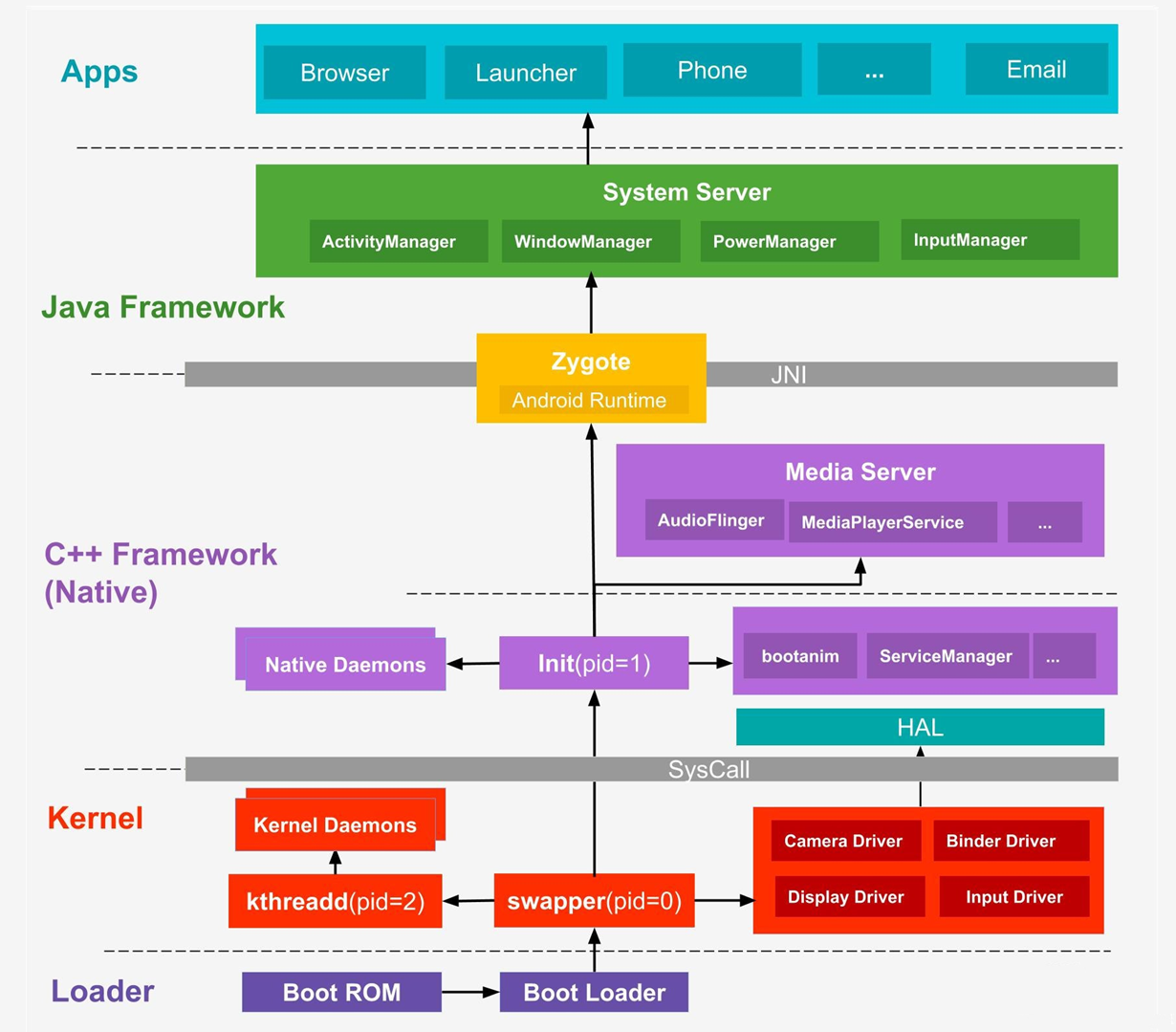
衍生内核线程总管 kthreadd(PID = 2):
swapper 在初始化收尾阶段孵化出 kthreadd 进程。kthreadd 作为后续所有内核后台线程(如内存回收 kswapd、块设备写入、驱动异步任务处理等)的父进程,负责内核态任务的管理与创建。
生成用户空间首个进程 init(PID = 1):
内核挂载根文件系统(RootFS),并在根文件系统中寻找并执行用户空间的可执行文件(Android 中的 /system/bin/init)。伴随 init 进程的加载,系统正式从内核态(Kernel Space)跨入用户态(User Space)。随后,init 进程作为所有用户态进程的鼻祖,开始加载系统服务、图形界面及用户应用。
init进程
- 解析配置文件:
init进程启动后,会挂载诸如/sys、/dev等文件系统,并解析配置文件(如init.rc脚本以及各个硬件相关的rc文件)。 - 孵化守护进程:
init会启动系统中不可或缺的基础守护进程(如ueventd处理热插拔、logd收集系统日志等)。 - 孕育 Zygote:
init进程最终会通过解析脚本,启动 Android 世界中最核心的次级进程——Zygote(孵化器)进程。
init.cpp 源码解析
在 Android 启动初期,init 进程会通过 LoadBootScripts 函数搜寻并解析各个分区(System、Vendor、Product 等)下的 .rc 配置文件。通过这些文件,init 得以明确接下来需要启动哪些系统服务、挂载哪些文件系统以及配置哪些权限。
源码路径:system/core/init/init.cpp
/**
 * @brief 加载并解析系统所有的 Boot 启动脚本(.rc 文件)
 *
 * @param action_manager 引用传入的 Action 管理器,用于存储解析出的触发现场与命令(on <trigger> ...)
 * @param service_list   引用传入的服务列表,用于存储解析出的服务元数据(service <name> <path> ...)
 */
static void LoadBootScripts(ActionManager& action_manager, ServiceList& service_list) {
    // 创建一个解析器(Parser),绑定了对应的 action 管理器和 service 列表
    Parser parser = CreateParser(action_manager, service_list);

    // 检查是否有通过系统属性 ro.boot.init_rc 指定的特殊启动脚本
    std::string bootscript = GetProperty("ro.boot.init_rc", "");
    if (bootscript.empty()) {
        // 1. 加载主配置文件 init.rc 以及 /system/etc/init 目录下的配置
        parser.ParseConfig("/system/etc/init/hw/init.rc");
        if (!parser.ParseConfig("/system/etc/init")) {
            // 如果解析失败或需要延迟导入,则记录到 late_import_paths 中后续处理
            late_import_paths.emplace_back("/system/etc/init");
        }

        // 2. 依次加载其他扩展分区的 init 配置目录
        parser.ParseConfig("/system_ext/etc/init");
        if (!parser.ParseConfig("/vendor/etc/init")) {
            late_import_paths.emplace_back("/vendor/etc/init");
        }
        if (!parser.ParseConfig("/odm/etc/init")) {
            late_import_paths.emplace_back("/odm/etc/init");
        }
        if (!parser.ParseConfig("/product/etc/init")) {
            late_import_paths.emplace_back("/product/etc/init");
        }
    } else {
        // 如果指定了自定义的 bootscript,则直接解析该脚本
        parser.ParseConfig(bootscript);
    }
}init.rc 源码解析
- 源码中的路径:system/core/rootdir/init.rc
- 运行时的绝对路径:
/system/etc/init/hw/init.rc(即手机烧录镜像后,init进程实际去读取的路径)
**编译规则说明:**在 system/core/rootdir/ 下的 Android.bp 中,通常会包含如下的编译配置:
prebuilt_etc {
    name: "init.rc",
    src: "init.rc",          // 指定源文件为当前目录下的 init.rc
    sub_dir: "init/hw",      // 指定安装到目标系统的子目录(即 etc/init/hw/)
    ...
}含义:该指令会将源码目录下的
init.rc编译并复制到目标设备系统的etc/init/hw/目录下。
surfaceflinger进程
frameworks/native/services/surfaceflinger/surfaceflinger.rc
frameworks/native/services/surfaceflinger/Android.bp
首先需要确定的是开机动画是通过bootanimation进程使用surfaceflinger进程去送显的。surfaceflinger进程是在init.rc中启动的
// frameworks/native/services/surfaceflinger/Android.bp
filegroup {
    name: "surfaceflinger_binary_sources",
    srcs: [
        ":libsurfaceflinger_sources",
        "main_surfaceflinger.cpp",
    ],
}

cc_binary {
    name: "surfaceflinger",
    defaults: [
        "libsurfaceflinger_binary",
    ],
    init_rc: ["surfaceflinger.rc"],
    srcs: [
        ":surfaceflinger_binary_sources",
        // Note: SurfaceFlingerFactory is not in the filegroup so that it can be easily replaced.
        // SurfaceFlingerFactory 没有放进这个 filegroup,这样它就可以很容易地被替换,
        // 如果放到filegroup 那么所有地方引用 surfaceflinger_binary_sources 都会包含它,替换比较麻烦。
        // 白话意思就是SurfaceFlingerFactory.cpp 是一个独立的可替换模块,厂商可自由更换(这里先不管是干什么的)
        "SurfaceFlingerFactory.cpp",
    ],
    shared_libs: [
        "libSurfaceFlingerProp",
    ],

    logtags: ["surfaceflinger.logtags"],
}
// frameworks/native/services/surfaceflinger/surfaceflinger.rc
service surfaceflinger /system/bin/surfaceflinger
    class core animation
    user system
    group graphics drmrpc readproc
    capabilities SYS_NICE
    onrestart restart --only-if-running zygote
    task_profiles HighPerformance

// frameworks/base/cmds/bootanimation/bootanim.rc
service bootanim /system/bin/bootanimation
    class core animation
    user graphics
    group graphics audio
    disabled          # 关键:标记为 disabled,不会自动启动
    oneshot           # 只运行一次,退出后不重启
    ioprio rt 0
task_profiles MaxPerformance模块定义 (Module Specification)
在 Android Soong 构建系统中,cc_binary 属于原生编译模块类型,用于定义并构建一个 C/C++ 原生可执行程序(Native Executable)。在该模块配置中:
- 动态库链接 (
shared_libs):指定程序在构建阶段需要链接、并在运行时依赖的 C/C++ 动态共享库(.so)。 - Init 脚本安装 (
init_rc):配置该可执行程序对应的系统初始化脚本(.rc文件),构建系统会将其打包并安装至系统镜像的指定位置。
服务启动与加载流程 (Service Initialization Flow)
- 解析引导脚本:系统启动过程中,内核挂载根文件系统并启动
init进程。init进程调用LoadBootScripts()函数,扫描并解析系统中安装的所有.rc引导脚本(包含由该cc_binary模块安装的配置文件)。 - 孵化服务进程:
init进程根据.rc脚本中声明的服务名称、执行路径、运行权限及触发条件(Trigger),以子进程形式孵化(fork)并启动该服务。
关键点:
disabled表示该服务不会随class_start core自动启动,需要被显式触发。
程序执行入口 (Program Entry Point)
- 入口文件:
main_surfaceflinger.cpp - 主函数:
int main()
当 init 进程启动该服务时,控制权将直接交付给 main_surfaceflinger.cpp 中的 main() 函数。该函数作为服务的核心入口,负责完成 IPC 线程池配置、进程调度策略提升、系统服务注册以及主事件循环的启动。
main() 函数
frameworks/native/services/surfaceflinger/main_surfaceflinger.cpp
frameworks/native/services/surfaceflinger/SurfaceFlingerDefaultFactory.cpp
frameworks/native/services/surfaceflinger/SurfaceFlinger.cpp
// frameworks/native/services/surfaceflinger/main_surfaceflinger.cpp 部分代码
int main() {
    // 启动图形内存分配服务 (Gralloc HAL)
    startGraphicsAllocatorService();

    // 限制进程内的 Binder 最大线程数为 4
    // Android 的 Binder 默认最大线程数通常是 16 个。
    // 对于独立的 SurfaceFlinger 进程,频繁创建 16 个线程会消耗相当可观的栈内存,还有各种锁竞争。
    ProcessState::self()->setThreadPoolMaxThreadCount(4);
	// 启动 Binder 线程池
    sp<ProcessState> ps(ProcessState::self());
    ps->startThreadPool();

    // 实例化 SurfaceFlinger 并设置 Binder 节点的最小调度策略下限
    // 并交给sp管理(这里代表强引用智能指针)
    sp<SurfaceFlinger> flinger = surfaceflinger::createSurfaceFlinger();

    // 初始化 RenderEngine、HWComposer、VSync 机制
    flinger->init();

    sp<IServiceManager> sm(defaultServiceManager());
    sm->addService(String16(SurfaceFlinger::getServiceName()), flinger, ...); // 注册旧版 Binder 服务
    sm->addService(String16("SurfaceFlingerAIDL"), composerAIDL, ...);        // 注册新版 AIDL 服务

	// 阻塞主线程,等待 VSync 信号驱动图层合成
    flinger->run();
}触发 BootAnimation 启动
SurfaceFlinger 在 init() 方法的末尾,通过异步线程调用 initBootProperties():
// frameworks/native/services/surfaceflinger/SurfaceFlinger.cpp

void SurfaceFlinger::init() FTL_FAKE_GUARD(kMainThreadContext){
	// Avoid blocking the main thread on `init` to set properties.
    mInitBootPropsFuture.callOnce([this] {
        return std::async(std::launch::async, &SurfaceFlinger::initBootProperties, this);
    });
}

// During boot, offload `initBootProperties` to another thread. `property_set` depends on
// `property_service`, which may be delayed by slow operations like `mount_all --late` in
// the `init` process. See b/34499826 and b/63844978.
// 在开机过程中,将 initBootProperties 卸载(移交)至另一个线程执行。property_set 依赖于 property_service,
// 而后者可能会因为 init 进程中执行诸如 mount_all --late 等耗时较长的操作而被延迟。
// 详见 Bug 单 b/34499826 和 b/63844978。
void SurfaceFlinger::initBootProperties() {
    property_set("service.sf.present_timestamp", mHasReliablePresentFences ? "1" : "0");

    if (base::GetBoolProperty("debug.sf.boot_animation"s, true) &&
        (base::GetIntProperty("debug.sf.nobootanimation"s, 0) == 0)) {
        // Reset and (if needed) start BootAnimation.
        property_set("service.bootanim.exit", "0");
        property_set("service.bootanim.progress", "0");
        property_set("ctl.start", "bootanim"); // ← 关键:触发 init 启动 bootanim 服务
    }
}sequenceDiagram
participant SF as SurfaceFlinger 进程
participant init as init 进程<br/>(属性服务)
participant BA as BootAnimation 进程
participant EGL as EGL/GPU
Note over SF: init() 末尾异步调用 initBootProperties()
SF->>SF: 检查 debug.sf.nobootanimation 属性
SF->>SF: property_set("service.bootanim.exit", "0")<br/>property_set("service.bootanim.progress", "0")
SF->>init: property_set("ctl.start", "bootanim")<br/>通过 Unix Socket → /dev/socket/property_service
Note over init: 识别 ctl. 前缀,视为控制指令<br/>从 ServiceList 检索 bootanim 服务<br/>执行 Service::Start()
init->>BA: fork() 派生子进程<br/>配置权限 (user graphics, group graphics audio)<br/>execve("/system/bin/bootanimation")
Note over BA: main() 入口<br/>setpriority() 提升为 DISPLAY 优先级
BA->>BA: ProcessState::startThreadPool()<br/>启动 Binder 线程池
BA->>SF: new BootAnimation() 构造函数<br/>new SurfaceComposerClient()<br/>建立 Binder 连接
Note over BA: onFirstRef() 自动触发:<br/>linkToComposerDeath() 注册 SF 死亡通知 <br/> preloadAnimation()<br/>findBootAnimationFile() 按优先级搜索<br/>APEX → product → oem → system <br/> loadAnimation(zip) 加载帧序列资源
BA->>SF: waitForSurfaceFlinger() 阻塞等待
SF-->>BA: SurfaceFlinger 服务就绪
BA->>BA: boot->run() → pthread_create() 创建动画线程
Note over BA: 新线程: readyToRun()<br/>→ initDisplaysAndSurfaces()
BA->>EGL: eglGetDisplay / eglInitialize<br/>eglCreateContext (GLES 2.0)
BA->>SF: createSurface("BootAnimation")<br/>Binder 调用,在 SF 中创建 Layer
SF-->>BA: 返回 SurfaceControl
BA->>EGL: eglCreateWindowSurface()<br/>eglMakeCurrent() 绑定上下文
Note over BA: threadLoop() 进入动画主循环<br/>initShaders() 初始化着色器
alt 未找到 zip
BA->>EGL: android() 默认 Logo 扫光动画
else 找到 zip
BA->>EGL: movie() 自定义帧序列动画
end
loop 每帧渲染
BA->>EGL: 绘制一帧
EGL->>SF: eglSwapBuffers() 提交 Buffer
SF->>SF: 图层合成 → 送显到屏幕
end
Note over BA: SystemServer 启动完成后<br/>设置 service.bootanim.exit = 1
BA->>BA: threadLoop() 检测退出条件,返回 false<br/>清理 EGL/Surface 资源,进程退出
Android 系统属性
system/core/libcutils/properties.cpp
bionic/libc/system_properties/system_properties.cpp
上层接口
// C 层 (libcutils)
int property_set(const char* key, const char* value);
int property_get(const char* key, char* value, const char* default_value);

// C++ 层 (libbase)
int GetIntProperty(const std::string& key, int default_value);
bool GetBoolProperty(const std::string& key, bool default_value);
std::string GetProperty(const std::string& key, const std::string& default_value);

// Java 层
SystemProperties.set("key", "value");
SystemProperties.get("key", "default_value");
SystemProperties.getInt("key", default_value);
SystemProperties.getBoolean("key", default_value);底层实现
// system/core/libcutils/properties.cpp
int property_set(const char* key, const char* value) {
    return __system_property_set(key, value);
}

int property_get(const char* key, char* value, const char* default_value) {
    int len = __system_property_get(key, value);
    if (len < 1 && default_value) {
        snprintf(value, PROPERTY_VALUE_MAX, "%s", default_value);
        return strlen(value);
    }
    return len;
}

// bionic/libc/system_properties/system_properties.cpp
int __system_property_set(const char* key, const char* value) {
    // 1. 连接 /dev/socket/property_service(Unix Domain Socket)
    // 2. 将 key + value 打包为 PROP_MSG_SETPROP2 协议消息
    // 3. 通过 socket 发送给 init 进程
    // 4. 阻塞等待 init 返回结果码
}

int __system_property_get(const char* key, char* value) {
    // 直接 mmap 映射 /dev/__properties__/ 共享内存
    // 不需要 socket 通信,不需要 init 参与
}写入 vs 读取
| 操作 | 底层实现 | 通信方式 | 是否需要 init |
|---|---|---|---|
| 写入 | __system_property_set() | Unix Socket → init | ✅ 必须经过 init(权限校验 + 触发 property trigger) |
| 读取 | __system_property_get() | 直接访问共享内存 | ❌ 零开销,所有进程可读 |
共享内存存储区
/dev/__properties__/                    ← 共享内存根目录(所有进程 mmap 映射)
├── property_info                       ← 属性 SELinux 上下文映射表
├── u:object_r:system_prop:s0           ← system_prop 类型属性
├── u:object_r:default_prop:s0          ← default_prop 类型属性
├── u:object_r:bootanim_prop:s0         ← bootanim 相关属性
└── ...(按 SELinux 类型分文件存储)

/data/property/
└── persistent_properties ← persist.* 属性持久化存储每个属性在共享内存中的结构:
struct prop_info {
    char name[PROP_NAME_MAX];     // 32 bytes
    char value[PROP_VALUE_MAX];   // 92 bytes
    uint32_t serial;              // 变更序列号(用于 __system_property_wait 通知)
};init 属性服务处理流程
property_set() 是对 bionic libc 中 __system_property_set() 的薄封装。该函数的底层实现位于bionic/system_properties.cpp,其核心行为是:
- 连接 Unix Domain Socket:客户端(SurfaceFlinger 进程)通过
AF_UNIXsocket 连接到 init 进程创建的属性服务 socket(路径为/dev/socket/property_service) - 发送协议消息:将属性名和属性值按照
PROP_MSG_SETPROP2协议格式打包,通过 socket 发送给 init 进程 - 等待响应:阻塞等待 init 处理完毕并返回结果码
补充说明:
__system_property_set()的完整实现位于bionic/libc/system_properties/system_properties.cpp,该文件属于 bionic libc,不在 AOSP 的system/core中。如果你需要追踪 socket 通信的协议细节,需要查看 bionic 的源码。
当 key 以 ctl. 开头时,init 不会把值存入属性区,而是把它当作一条指令:
| 写入的 key | value | init 执行的动作 |
|---|---|---|
ctl.start | 服务名 | 启动该服务 |
ctl.stop | 服务名 | 停止该服务 |
ctl.restart | 服务名 | 重启该服务 |
bootanimation进程
当 init 进程执行 LoadBootScripts() 解析 bootanim.rc 时,会将 service bootanim 节点解析为一个 Service 内存结构体并存入 ServiceList。由于配置中声明了 disabled,因此当 init 执行 class_start core 或 class_start animation 时,不会自动拉起该服务。
service bootanim /system/bin/bootanimation
    class core animation
    user graphics
    group graphics audio

    oneshot
    ioprio rt 0
task_profiles MaxPerformanceSurfaceFlinger进程 通过属性服务向 init 进程发送系统控制指令:SystemProperties.set("ctl.start", "bootanim"))。
init 进程的事件循环监听到 ctl.start = bootanim 属性变化后,从 ServiceList 中检索出 bootanim 服务对象,执行 Service::Start():
- 调用
fork()派生出子进程。 - 在子进程中配置权限(根据
.rc中的user graphics、group graphics audio和task_profiles进行降权与 CGroup 调度绑定)。 - 调用
execve("/system/bin/bootanimation", ...)替换进程映像。
代码入口执行: 替换成功后,子进程进入 /system/bin/bootanimation 可执行文件的入口点——即 bootanimation_main.cpp 的 main() 函数,随后创建 Binder 客户端连接 SurfaceFlinger 并开始渲染动画。
main()函数
frameworks/base/cmds/bootanimation/bootanimation_main.cpp
int main()
{
    // 提升进程优先级为 DISPLAY 级别(最高实时优先级之一)
    setpriority(PRIO_PROCESS, 0, ANDROID_PRIORITY_DISPLAY);

    // 检查是否禁用了开机动画(通过 ro.bootanim.disable 等属性判断)
    bool noBootAnimation = bootAnimationDisabled();
    ALOGI_IF(noBootAnimation, "boot animation disabled");

    if (!noBootAnimation) {
        // 初始化 Binder 进程环境
        sp<ProcessState> proc(ProcessState::self());
        ProcessState::self()->startThreadPool();

        // 创建 BootAnimation 对象(可能耗时 ~200ms 加载 zip)
        // 音频播放回调
        sp<BootAnimation> boot = new BootAnimation(audioplay::createAnimationCallbacks());

        // 阻塞等待 SurfaceFlinger 服务就绪
        waitForSurfaceFlinger();

        // 启动动画线程
        boot->run("BootAnimation", PRIORITY_DISPLAY);

        ALOGV("Boot animation set up. Joining pool.");

        // 主线程加入 Binder 线程池(阻塞,直到进程退出)
        IPCThreadState::self()->joinThreadPool();
    }
    return 0;
}构造与预加载
构造函数
BootAnimation::BootAnimation(sp<Callbacks> callbacks)
        : Thread(false), mLooper(new Looper(false)), mClockEnabled(true),
          mTimeIsAccurate(false), mTimeFormat12Hour(false),
          mTimeCheckThread(nullptr), mCallbacks(callbacks) {
    ATRACE_CALL();

    // 创建与 SurfaceFlinger 的 Binder 连接会话
    mSession = sp<SurfaceComposerClient>::make();

    // 判断是开机动画还是关机动画
    std::string powerCtl = android::base::GetProperty("sys.powerctl", "");
    if (powerCtl.empty()) {
        mShuttingDown = false;   // 开机动画
    } else {
        mShuttingDown = true;    // 关机动画
    }
}
BootAnimation继承自Thread(utils/Thread.h),是一个引用计数对象。当sp<BootAnimation>首次持有时,会自动调用onFirstRef()。
预加载动画资源
void BootAnimation::onFirstRef() {
    ATRACE_CALL();

    // 注册 SurfaceFlinger 死亡通知
    status_t err = mSession->linkToComposerDeath(this);
    SLOGE_IF(err, "linkToComposerDeath failed (%s)", strerror(-err));

    if (err == NO_ERROR) {
        // 在 waitForSurfaceFlinger() 之前就预加载动画资源
        // 这样可以与 SF 启动并行,节省约 200ms
        ALOGD("%sAnimationPreloadTiming start time: %" PRId64 "ms",
                mShuttingDown ? "Shutdown" : "Boot", elapsedRealtime());
        preloadAnimation();
        ALOGD("%sAnimationPreloadTiming stop time: %" PRId64 "ms",
                mShuttingDown ? "Shutdown" : "Boot", elapsedRealtime());
    }
}
bool BootAnimation::preloadAnimation() {
    ATRACE_CALL();
    findBootAnimationFile();          // 查找动画文件
    if (!mZipFileName.empty()) {
        mAnimation = loadAnimation(mZipFileName);   // 加载 zip 包
        return (mAnimation != nullptr);
    }
    return false;
}

static const char OEM_BOOTANIMATION_FILE[] = "/oem/media/bootanimation.zip";
static const char PRODUCT_BOOTANIMATION_DIR[] = "/product/media/";
static const char PRODUCT_BOOTANIMATION_DARK_FILE[] = "bootanimation-dark.zip";
static const char PRODUCT_BOOTANIMATION_FILE[] = "bootanimation.zip";
static const char SYSTEM_BOOTANIMATION_FILE[] = "/system/media/bootanimation.zip";  // 系统默认
static const char APEX_BOOTANIMATION_FILE[] = "/apex/com.android.bootanimation/etc/bootanimation.zip";
static const char OEM_SHUTDOWNANIMATION_FILE[] = "/oem/media/shutdownanimation.zip";
static const char PRODUCT_SHUTDOWNANIMATION_FILE[] = "/product/media/shutdownanimation.zip";
static const char SYSTEM_SHUTDOWNANIMATION_FILE[] = "/system/media/shutdownanimation.zip"
void BootAnimation::findBootAnimationFile() {
    ATRACE_CALL();
    // 读取系统属性 ro.boot.theme,如果值为 1 则播放暗色主题的开机动画,否则播放默认(亮色)动画。
    const bool playDarkAnim = android::base::GetIntProperty("ro.boot.theme", 0) == 1;

    // 产品定制开机动画
    const std::string productBootanimationFile = PRODUCT_BOOTANIMATION_DIR +
        android::base::GetProperty("ro.product.bootanim.file", playDarkAnim ?
        PRODUCT_BOOTANIMATION_DARK_FILE : PRODUCT_BOOTANIMATION_FILE);

    // 定义了三个动画文件列表,每个列表都是 优先级从高到低 排列的。后面的代码会遍历列表,找到第一个存在的文件就用它
    static const std::vector<std::string> bootFiles = {
        APEX_BOOTANIMATION_FILE, productBootanimationFile,
        OEM_BOOTANIMATION_FILE, SYSTEM_BOOTANIMATION_FILE
    };
    static const std::vector<std::string> shutdownFiles = {
        PRODUCT_SHUTDOWNANIMATION_FILE, OEM_SHUTDOWNANIMATION_FILE, SYSTEM_SHUTDOWNANIMATION_FILE, ""
    };
    static const std::vector<std::string> userspaceRebootFiles = {
        PRODUCT_USERSPACE_REBOOT_ANIMATION_FILE, OEM_USERSPACE_REBOOT_ANIMATION_FILE,
        SYSTEM_USERSPACE_REBOOT_ANIMATION_FILE,
    };

	// 根据场景选择搜索列表
    if (android::base::GetBoolProperty("sys.init.userspace_reboot.in_progress", false)) {
        findBootAnimationFileInternal(userspaceRebootFiles);
    } else if (mShuttingDown) {
        findBootAnimationFileInternal(shutdownFiles);
    } else {
        findBootAnimationFileInternal(bootFiles);// ← 开机走这里
    }
}
bool BootAnimation::findBootAnimationFileInternal(const std::vector<std::string> &files) {
    ATRACE_CALL();
    for (const std::string& f : files) {
        if (access(f.c_str(), R_OK) == 0) {
            mZipFileName = f.c_str();
            return true;
        }
    }
    return false;
}搜索策略:依次检查每个路径的
access(f, R_OK)是否可读,找到第一个即停止,将路径存入mZipFileName。如果所有路径都不存在,mZipFileName保持为空。
启动动画线程
system/core/libutils/Threads.cpp
boot->run("BootAnimation", PRIORITY_DISPLAY) 调用的是 Thread::run(),它会:
- 创建一个新的 pthread 线程
- 在新线程中先调用
readyToRun()(一次性初始化) - 然后循环调用
threadLoop()(直到返回 false 或调用 requestExit(),但是这里的循环似乎没什么作用,因为内部一直在循环)
main()                                    ← bootanimation_main.cpp
  └── boot->run("BootAnimation", ...)    ← 创建线程
        └── pthread_create(_threadLoop)   ← threads.cpp
              └── _threadLoop()           ← threads.cpp(新线程中)
                    ├── readyToRun()      ← BootAnimation.cpp(初始化 GL)
                    └── threadLoop()      ← BootAnimation.cpp(加载+播放动画)
└── playAnimation() ← 渲染每一帧初始化显示和 Surface
status_t BootAnimation::readyToRun() {
    ATRACE_CALL();
    mAssets.addDefaultAssets();
    return initDisplaysAndSurfaces();   // ← 核心初始化
}创建图形环境
status_t BootAnimation::initDisplaysAndSurfaces() {
    // 获取物理显示器 ID 列表
    std::vector<PhysicalDisplayId> displayIds = SurfaceComposerClient::getPhysicalDisplayIds();

    // 如果未启用多屏,只使用第一个显示器
    if (!com::android::graphics::bootanimation::flags::multidisplay()) {
        displayIds.erase(displayIds.begin() + 1, displayIds.end());
    }

    // 获取每个显示器的 display token
    for (const auto id : displayIds) {
        const auto token = SurfaceComposerClient::getPhysicalDisplayToken(id);
        mDisplays.push_back({.displayToken = token});
    }

    // 初始化 EGL 环境(GPU绘制)
    mEgl = eglGetDisplay(EGL_DEFAULT_DISPLAY);
    eglInitialize(mEgl, nullptr, nullptr);
    EGLConfig config = getEglConfig(mEgl);       // RGB888, 无深度缓冲
    EGLint contextAttributes[] = {EGL_CONTEXT_CLIENT_VERSION, 2, EGL_NONE};
    mEglContext = eglCreateContext(mEgl, config, nullptr, contextAttributes);  // GLES 2.0

    // 为每个显示器创建 Surface
    for (auto& display : mDisplays) {
        // 获取显示器分辨率
        DisplayMode displayMode;
        SurfaceComposerClient::getActiveDisplayMode(display.displayToken, &displayMode);
        ui::Size resolution = displayMode.resolution;
        resolution = limitSurfaceSize(resolution.width, resolution.height);

        // 创建surfacecontrol,在对应的surfaceflinger创建layer
        display.surfaceControl = session()->createSurface(
            String8("BootAnimation"), resolution.width, resolution.height,
            PIXEL_FORMAT_RGB_565, ISurfaceComposerClient::eOpaque);

        // 将 Surface 关联到显示器的 LayerStack
        configureDisplayAndLayerStack(display, ui::LayerStack::fromValue(displayIdx));

        // 创建surface画布对应surfaceflinger的bufferqueue
        display.surface = display.surfaceControl->getSurface();
        display.eglSurface = eglCreateWindowSurface(mEgl, config, display.surface.get(), nullptr);

        // 设置为当前 EGL 上下文
        eglMakeCurrent(mEgl, display.eglSurface, display.eglSurface, mEglContext);
    }

    // 注册显示器热插拔事件接收器
    mDisplayEventReceiver = std::make_unique<DisplayEventReceiver>();
    mLooper->addFd(mDisplayEventReceiver->getFd(), 0, Looper::EVENT_INPUT,
                   new DisplayEventCallback(this), nullptr);

    return NO_ERROR;
}动画主循环入口
bool BootAnimation::threadLoop() {
    ATRACE_CALL();
    bool result;
    initShaders();   // 初始化 OpenGL ES 着色器

    // 根据是否找到 bootanimation.zip 决定播放模式
    if (mZipFileName.empty()) {
        // ****没有找到 zip → 使用默认 Android Logo 动画
        ALOGD("No animation file");
        result = android(mDisplays.front());
    } else {
        // ****找到了 zip → 播放自定义动画
        result = movie();
    }

    // 动画结束,清理资源
    mCallbacks->shutdown();
    eglMakeCurrent(mEgl, EGL_NO_SURFACE, EGL_NO_SURFACE, EGL_NO_CONTEXT);
    eglDestroyContext(mEgl, mEglContext);
    for (auto& display : mDisplays) {
        eglDestroySurface(mEgl, display.eglSurface);
        display.surface.clear();
        display.surfaceControl.clear();
    }
    eglTerminate(mEgl);
    eglReleaseThread();
    IPCThreadState::self()->stopProcess();
    return result;
}两种播放模式:
| 条件 | 模式 | 方法 | 说明 |
|---|---|---|---|
mZipFileName 为空 | 默认动画 | android() | 使用内置的 android-logo-mask.png + android-logo-shine.png |
mZipFileName 非空 | 自定义动画 | movie() | 加载 bootanimation.zip 播放帧序列 |
默认 Android Logo 动画
bool BootAnimation::android(const Display& display) {
    // 加载两张内置纹理
    initTexture(&mAndroid[0], mAssets, "images/android-logo-mask.png");   // Android Logo 遮罩
    initTexture(&mAndroid[1], mAssets, "images/android-logo-shine.png");  // 光泽扫过效果

    // 清屏为黑色
    glClearColor(0, 0, 0, 1);
    glClear(GL_COLOR_BUFFER_BIT);
    eglSwapBuffers(mEgl, display.eglSurface);//绘制一帧

    // 动画开始时间
    const nsecs_t startTime = systemTime();
    // 动画循环
    do {
        processDisplayEvents();   // 处理显示器热插拔,这里可能屏幕会发生改变

        // 计算 Logo 居中位置
        const GLint xc = (display.width  - mAndroid[0].w) / 2;
        const GLint yc = (display.height - mAndroid[0].h) / 2;

        // 计算光泽扫过偏移量(基于时间)
        nsecs_t now = systemTime();
        double time = now - startTime;// 当前事件
        //每帧移动4个像素,移动移动了多少圈,比如2.5
        float t = 4.0f * float(time / us2ns(16667)) / mAndroid[1].w;
        // j计算距离起点的位置,0.5* logo宽度
        GLint offset = (1 - (t - floorf(t))) * mAndroid[1].w;
        GLint x = xc - offset;

        glClear(GL_COLOR_BUFFER_BIT);

        // 先画光泽层(shine texture),两份拼接实现无缝滚动
        glDisable(GL_BLEND);
        glBindTexture(GL_TEXTURE_2D, mAndroid[1].name);
        drawTexturedQuad(x,                 yc, mAndroid[1].w, mAndroid[1].h, display);
        drawTexturedQuad(x + mAndroid[1].w, yc, mAndroid[1].w, mAndroid[1].h, display);

        // 再画 Logo 遮罩层(mask texture),通过 alpha 混合裁剪出 Logo 形状
        glEnable(GL_BLEND);
        glBindTexture(GL_TEXTURE_2D, mAndroid[0].name);
        drawTexturedQuad(xc, yc, mAndroid[0].w, mAndroid[0].h, display);

        eglSwapBuffers(mEgl, display.eglSurface);

        // 帧率控制:~12fps(83ms/帧),节省 CPU,减慢绘制速度正常一帧是16.66ms
        const nsecs_t sleepTime = 83333 - ns2us(systemTime() - now);
        if (sleepTime > 0) usleep(sleepTime);

        checkExit();   // 检查 service.bootanim.exit 属性
    } while (!exitPending());

    return false;
}自定义动画 — movie()
// frameworks/base/cmds/bootanimation/BootAnimation.h
struct Animation : public RefBase {
    float fps;
    int width;
    int height;
    std::string fileName;
    std::vector<Part> parts;
};

struct Part {
    std::string path;           // 帧图片所在目录,如 "part0"
    int count;                  // 播放次数,0 = 无限循环
    int pause;                  // 播完后暂停的帧数
    std::vector<Frame> frames;  // 这一段的每一帧
    // ...
};


// BootAnimation.cpp
bool BootAnimation::movie() {

    if (mAnimation == nullptr) {
        mAnimation = loadAnimation(mZipFileName); //解析zip加载动画
    }

    if (mAnimation == nullptr)
        return false;

    // mCallbacks->init() may get called recursively,
    // this loop is needed to get the same results
    // 加载子动画的音频资源
    for (const Animation::Part& part : mAnimation->parts) {
        if (part.animation != nullptr) {
            mCallbacks->init(part.animation->parts);
        }
    }
    // 动画音频
    mCallbacks->init(mAnimation->parts);

    // ....
    // ***开始播放动画 ← 核心调用
    playAnimation(*mAnimation);

    // ....
    releaseAnimation(mAnimation);
    mAnimation = nullptr;

    return false;
}
bool BootAnimation::playAnimation(const Animation& animation) {

    // part个数
    const size_t numParts = animation.parts.size();

    for (size_t partIdx = 0; partIdx < numParts; partIdx++) {
        const Animation::Part& part(animation.parts[partIdx]);
        const size_t numFramesInPart = part.frames.size();
        glBindTexture(GL_TEXTURE_2D, 0);

        // 如果 Part 是嵌套的子动画包,递归播放
        if (part.animation != nullptr) {
            playAnimation(*part.animation);
            if (exitPending()) break;
            continue;
        }

        // ═══════ 中层循环:重复播放当前 Part ═══════
        // part.count 控制重复次数,0 表示无限循环(直到退出信号)
        for (int frameIdx = 0;
             !part.count || frameIdx < part.count || fadedFramesCount > 0;
             frameIdx++) {

            // 检查是否应该停止(收到退出信号 + 淡出完成)
            if (shouldStopPlayingPart(part, fadedFramesCount, lastDisplayedProgress)) break;

            // 通知音频回调当前播放的 Part
            mCallbacks->playPart(partIdx, part, frameIdx);

            // 设置背景色
            glClearColor(part.backgroundColor[0], part.backgroundColor[1],
                         part.backgroundColor[2], 1.0f);
          // ═══════ 内层循环:遍历 Part 中的每一帧 ═══════
            for (size_t frameIdxInPart = 0; frameIdxInPart < numFramesInPart; frameIdxInPart++) {
                if (shouldStopPlayingPart(part, fadedFramesCount, lastDisplayedProgress)) break;

                processDisplayEvents();

                const Animation::Frame& frame(part.frames[frameIdxInPart]);
                nsecs_t lastFrame = systemTime();

                // 加载帧纹理到 GPU
                if (frameIdx > 0) {
                    glBindTexture(GL_TEXTURE_2D, frame.tid);   // 已加载过,直接绑定
                } else {
                    if (part.count != 1) {
                        glGenTextures(1, &frame.tid);
                        glBindTexture(GL_TEXTURE_2D, frame.tid);
                    }
                    int w, h;
                    initTexture(frame.map, &w, &h, false);   // 首次加载
                }

                // 计算淡出因子(退出时的渐隐效果)
                float fade = 0;
                if (exitPending() && part.hasFadingPhase()) {
                    fade = static_cast<float>(++fadedFramesCount) / part.framesToFadeCount;
                }

                // ──── 对每个物理显示器渲染 ────
                for (const auto& display : mDisplays) {
                    eglMakeCurrent(mEgl, display.eglSurface, display.eglSurface, mEglContext);

                    // 计算动画在屏幕上的居中位置(考虑分辨率缩放)
                    const double ratioW = (double)display.width / display.initWidth;
                    const double ratioH = (double)display.height / display.initHeight;
                    const int animationX = (display.width - animation.width * ratioW) / 2;
                    const int animationY = (display.height - animation.height * ratioH) / 2;

                    glClear(GL_COLOR_BUFFER_BIT);

                    // 使用 GLES 着色器绘制帧纹理
                    glUseProgram(mImageShader);
                    glUniform1i(mImageTextureLocation, 0);
                    glUniform1f(mImageFadeLocation, fade);
                    glEnable(GL_BLEND);
                    drawTexturedQuad(xc, frameDrawY, trimWidth, trimHeight, display);
                    glDisable(GL_BLEND);

                    // 如果配置了时钟,绘制时钟文字
                    if (mClockEnabled && mTimeIsAccurate && validClock(part)) {
                        drawClock(animation.clockFont, part.clockPosX, part.clockPosY, display);
                    }

                    // 如果是最后一个 Part 且启用了进度条,绘制进度
                    if (displayProgress) {
                        drawProgress(lastDisplayedProgress, animation.progressFont,
                                     posX, posY, display);
                    }

                    // 提交帧到buffer
                    eglSwapBuffers(mEgl, display.eglSurface);
                }

                // 帧率控制:精确等待到下一帧时间点
                nsecs_t now = systemTime();
               	// 当前帧时间和上一帧时间的间隔
                nsecs_t delay = frameDuration - (now - lastFrame);
                if (delay > 0) {
                    struct timespec spec;
                    spec.tv_sec  = (now + delay) / 1000000000;
                    spec.tv_nsec = (now + delay) % 1000000000;
                    clock_nanosleep(CLOCK_MONOTONIC, TIMER_ABSTIME, &spec, nullptr);
                }

                checkExit();   // 检查 service.bootanim.exit 属性
            }
        }
      // Part 之间的暂停
        // desc.txt 中每段可以设置暂停帧数,播完一段后等一下再播下一段。
        int pauseDuration = part.pause * ns2us(frameDuration);
        while(pauseDuration > 0 && !exitPending()){
            if (pauseDuration > MAX_CHECK_EXIT_INTERVAL_US) {
                usleep(MAX_CHECK_EXIT_INTERVAL_US);
                pauseDuration -= MAX_CHECK_EXIT_INTERVAL_US;
            } else {
                usleep(pauseDuration);
                break;
            }
            checkExit();
         }
        // ...
        // 这段代码在 playAnimation() 的最内层循环末尾
        // 处理的是:系统启动完成了,但当前段是无限循环(count=0),怎么退出
        if (exitPending()                    // 条件1:系统已启动完成,bootanim 该退出了
            && !part.count                   // 条件2:当前段 count=0,即无限循环播放
            && mCurrentInset >= mTargetInset // 条件3:inset 动画过渡已完成(没有正在进行的缩放/位移)
            && !part.hasFadingPhase()) {     // 条件4:当前段没有配置淡出效果
                                             // 四个条件全满足 = "死循环段,又没法自然结束"
            // ── 有进度条的情况 ──
            if (lastDisplayedProgress != 0   // 正在显示进度条(不是 0 说明开启过进度显示)
                && lastDisplayedProgress != 100) {  // 但还没跑到 100%
                android::base::SetProperty(PROGRESS_PROP_NAME, "100");  // 强制把进度属性设为 100
                continue;  // ★ 不退出!继续播放当前段
                           // 下一轮循环时 progress=100,就不会进这个 if,走到下面的 break
                           // 目的:让进度条视觉上先跑满,再退出,避免进度条卡在比如 87% 就突然切画面
            }
            // ── 没有进度条,或进度条已经 100% ──
            break;  // ★ 跳出无限循环,进入下一个 part 或结束动画
                    // 注释也写了:exit the infinite non-fading part
                    //            when it has been played at least once
        }

    }
    // ......
    return true;
}退出机制 — checkExit()
void BootAnimation::checkExit() {
    char value[PROPERTY_VALUE_MAX];
    // 第一步:读属性值 "service.bootanim.exit",读不到就默认 "0"
    property_get(EXIT_PROP_NAME, value, "0");
    // 第二步:转成整数
    int exitnow = atoi(value);
    // 第三步:非零就退出
    if (exitnow) {
        //requestExit() 不会立刻杀死线程,只是把 mExitPending 设为 true。
        // 当前帧画完后,_threadLoop 的循环检查到这个标志,就不再调用下一帧的 threadLoop(),线程自然结束。
        requestExit();
    }
}
// system/core/libutils/Threads.cpp
void Thread::requestExit()
{
    Mutex::Autolock _l(mLock);
    mExitPending = true; // 这里如果设置为true,那么exitPending返回为true,那么我们的动画播放循环也就会结束了
}

bool Thread::exitPending() const
{
    Mutex::Autolock _l(mLock);
    return mExitPending;
}退出触发方:
service.bootanim.exit由 SurfaceFlinger 的bootFinished()方法设置为"1"。而bootFinished()是由 WindowManagerService 在系统启动完成后通过 Binder 调用的。Launcher 绘制首帧后触发完成信号高数WMS,WMS通知bootanim 退出
bootanimation.zip 的结构
bootanimation.zip
├── desc.txt              ← 描述文件:宽度 高度 fps + Part 定义
│   示例:
│   1080 1920 30          ← 宽 高 帧率
│   p 1 0 part0           ← p: 播放模式, count=1, pause=0, 目录=part0
│   p 0 0 part1           ← count=0 表示无限循环直到退出
│
├── part0/                ← Part 0 的帧序列
│   ├── 0000.png
│   ├── 0001.png
│   └── ...
│
└── part1/                ← Part 1 的帧序列
    ├── 0000.png
    ├── 0001.png
└── ...desc.txt 中的 Part 控制参数:
| 字段 | 含义 |
|---|---|
p / c | p = 播放完后继续下一个 Part;c = 播放完后重新开始 |
count | 重复次数,0 = 无限循环 |
pause | Part 结束后的暂停帧数 |
| 目录名 | 帧图片所在的子目录 |
评论区
欢迎分享你的思考、补充或问题。
评论加载中…